|
|
| Línea 55: |
Línea 55: |
|
| |
|
|
| |
|
| <!--
| |
| Análisis interno:
| |
| Este criterio impacta principalmente a: Personas con discapacidad visual total
| |
| Problema grave: Si no se proporciona texto alternativo para contenido visual o elementos no textuales, un lector de pantalla no podrá interpretar lo que esos elementos comunican. El usuario queda “ciego” ante la información, lo que impide acceder a contenido esencial o funcional.
| |
| -->
| |
| <html>
| |
| <!-- criterio 1.1.1-A -->
| |
| <article class="wcag-card">
| |
| <section class="wcag-info">
| |
| <ul>
| |
| <li>
| |
| <span class="label">Nivel:</span>
| |
| <span class="value">A</span>
| |
| </li>
| |
|
| |
| <li>
| |
| <span class="label">Versión:</span>
| |
| <span class="value">2.2</span>
| |
| </li>
| |
|
| |
| <li>
| |
| <span class="label">Principio:</span>
| |
| <span class="value">1. Perceptible</span>
| |
| </li>
| |
|
| |
| <li>
| |
| <span class="label">Pauta:</span>
| |
| <span class="value">1.1 Textos alternativos</span>
| |
| </li>
| |
|
| |
| <li>
| |
| <span class="label">Categoría:</span>
| |
| <span class="value">Contenido</span>
| |
| </li>
| |
|
| |
| <li>
| |
| <span class="label">Subcategoría:</span>
| |
| <span class="value">No-texto</span>
| |
| </li>
| |
| </ul>
| |
| </section>
| |
|
| |
| <section class="wcag-users">
| |
| <p>Usuarios afectados</p>
| |
| <ul>
| |
| <li>
| |
| <img src="/images/4/4d/Sinvision.png" alt="Icono de una persona con discapacidad visual" />
| |
| <span>Personas con discapacidad visual total</span>
| |
| </li>
| |
| </ul>
| |
| </section>
| |
| </article>
| |
| </html>
| |
|
| |
|
|
| |
|
Revisión del 21:59 21 oct 2025
-
Nivel:
A
-
Versión:
2.2
-
Principio:
1. Perceptible
-
Pauta:
1.1 Textos alternativos
-
Categoría:
Contenido
-
Subcategoría:
No-texto
Usuarios afectados
-
 Personas con discapacidad visual total
1.1.1- A. Todo contenido no textual debe disponer de una alternativa textual breve que, siempre que sea posible, proporciona la misma información o cumple el mismo propósito que el contenido no textual
EVALUACIÓN
HERRAMIENTAS DE APOYO
Nombre de la herramienta: Web Developer Toolbar
PROCEDIMIENTO DE COMPROBACIÓN
1. Seleccionar “Images – Outline images without alt attributes” y comprobar la página. Si hay alguna imagen resaltada, es un error y debe proporcionársele un atributo “alt”.
2. Seleccionar “Images – Display alt attributes”. Comprobar la página valorando si el texto de dicho atributo describe el cometido de la imagen.
REFERENCIA WCAG 2.1
- G94: Providing short text alternative for non-text content that serves the same purpose and presents the same information as the non-text content
- H35: Providing text alternatives on applet elements
- H37: Using alt attributes on img elements
- H53: Using the body of the object element
- F13: Failure of Success Criterion 1.1.1 and 1.4.1 due to having a text alternative that does not include information that is conveyed by color differences in the image
- F30: Failure of Success Criterion 1.1.1 and 1.2.1 due to using text alternatives that are not alternatives (e.g., filenames or placeholder text)
- F65: Failure of Success Criterion 1.1.1 due to omitting the alt attribute or text alternative on img elements, area elements, and input elements of type "image"
LISTA DE EJEMPLOS ACCESIBLES Y NO ACCESIBLES
Se listan diferentes ejemplos
EJEMPLO ACCESIBLE
Ejemplo accesible 1
Esta imagen es accesible porque tiene un atributo "alt" y se muestra un texto alternativo que describe la imagen de forma correcta. Es una imagen que complementa la información textual y por ello necesita una descripción para comunicar en texto su contenido
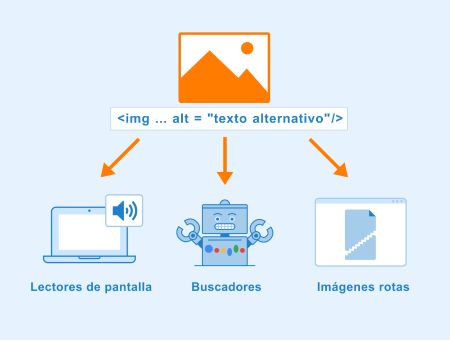
alt="Atributo alt con un texto descriptivo y adecuado a la imagen"
EJEMPLO NO ACCESIBLE
Exemple NO accesible 1
Falta etiqueta alt en la imagen

alt=""
    Exemple NO accesible 2
    El texto del atributo alt que describe la imagen no corresponde a la información visual de la imagen

    alt=""

En esta imagen se puede observar como correctamente hay un atributo alt
{{sust:discutido}}
<ref>Plantilla:Cita web</ref>
Cambios recientes